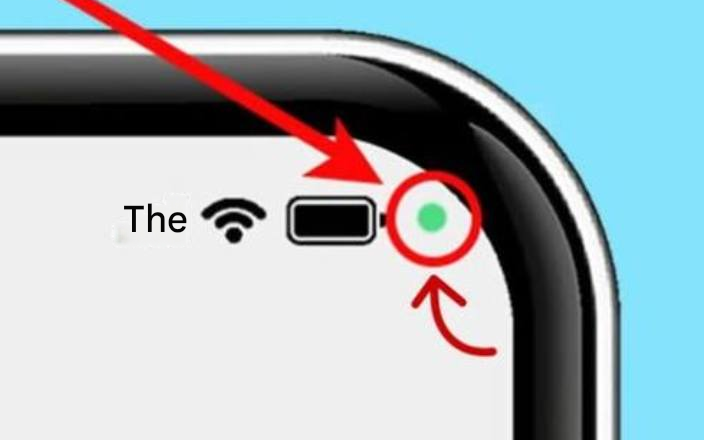
If a mysterious little green dot appears at the top of your phone, you definitely shouldn’t ignore it.(1/10)
When this indicator is lit, it means the app is using the camera or microphone. This happens when you’re video chatting, taking photos, or using the voice recorder.
It is similar to the red dot on a camera that indicates recording.
© SHUTTERSTOCK
A tool designed to protect privacy(2/10)
Apple and Google have integrated this indicator into their operating systems to provide users with greater transparency. This visual element allows them to immediately see if an app is using the microphone or camera.
© SHUTTERSTOCK
Real-time alert (3/10)
This indicator light helps detect unauthorized access to these features. If you’re not using your phone and see this indicator light, you should be concerned. This device is therefore part of a broader effort to improve digital security.
© SHUTTERSTOCK
Danger of malicious applications (4/10)
Cybercriminals are constantly looking for ways to bypass security measures. Fake apps discreetly use the camera or microphone to collect personal data. A green light may signal a potential breach, which should not be ignored.
© SHUTTERSTOCK
Recognizing suspicious signs (5/10)
If the light comes on when no apps using the camera or microphone are open, it may be cause for concern. It’s best to run a few checks to ensure no one is trying to access your device illegally.
© SHUTTERSTOCK
Best practices to adopt (6/10)
Regularly review the permissions granted to installed applications. Pay particular attention to recently downloaded or unfamiliar software. To reduce the risk of privacy breaches, only use trusted applications.
© SHUTTERSTOCK
When in doubt, react immediately (7/10)
If your phone is locked but the green dot still appears, it may indicate a spyware threat. Take quick action: close all open apps, restart your phone, and recheck permissions for any suspicious apps.
© SHUTTERSTOCK
Strengthen your smartphone’s protection (8/10)
Installing a cybersecurity solution can also add a layer of protection against these types of attacks. Some mobile antivirus programs offer tools that detect and block malicious apps before they can cause damage.
© SHUTTERSTOCK
Constant vigilance (9/10)
Even with this alert system, a proactive approach to digital threats is crucial. Never ignore a suspicious signal and avoid installing questionable apps. Ideally, you should also familiarize yourself with cybersecurity best practices. These are simple habits, but they will protect you every day.
© SHUTTERSTOCK
A useful device, but requires monitoring. (10/10)
This green indicator is therefore a valuable tool you can use to protect your device. Now that you understand its role and purpose, it’s time to grab your smartphones and do some spring cleaning by removing all unwanted or unnecessary apps.
© SHUTTERSTOCK
Sometimes a small green dot appears at the top of your smartphone screen. This visual cue, which may seem insignificant, is actually a crucial security feature.